INCLUDED IN EVERY PLAN

Your paperwork, made for you.

Capture the load once. worxTMS makes the waybill, the proof of delivery, the invoice and the statement from it. Every document carries your company name and looks professional, so customers and their accounts teams pay faster.

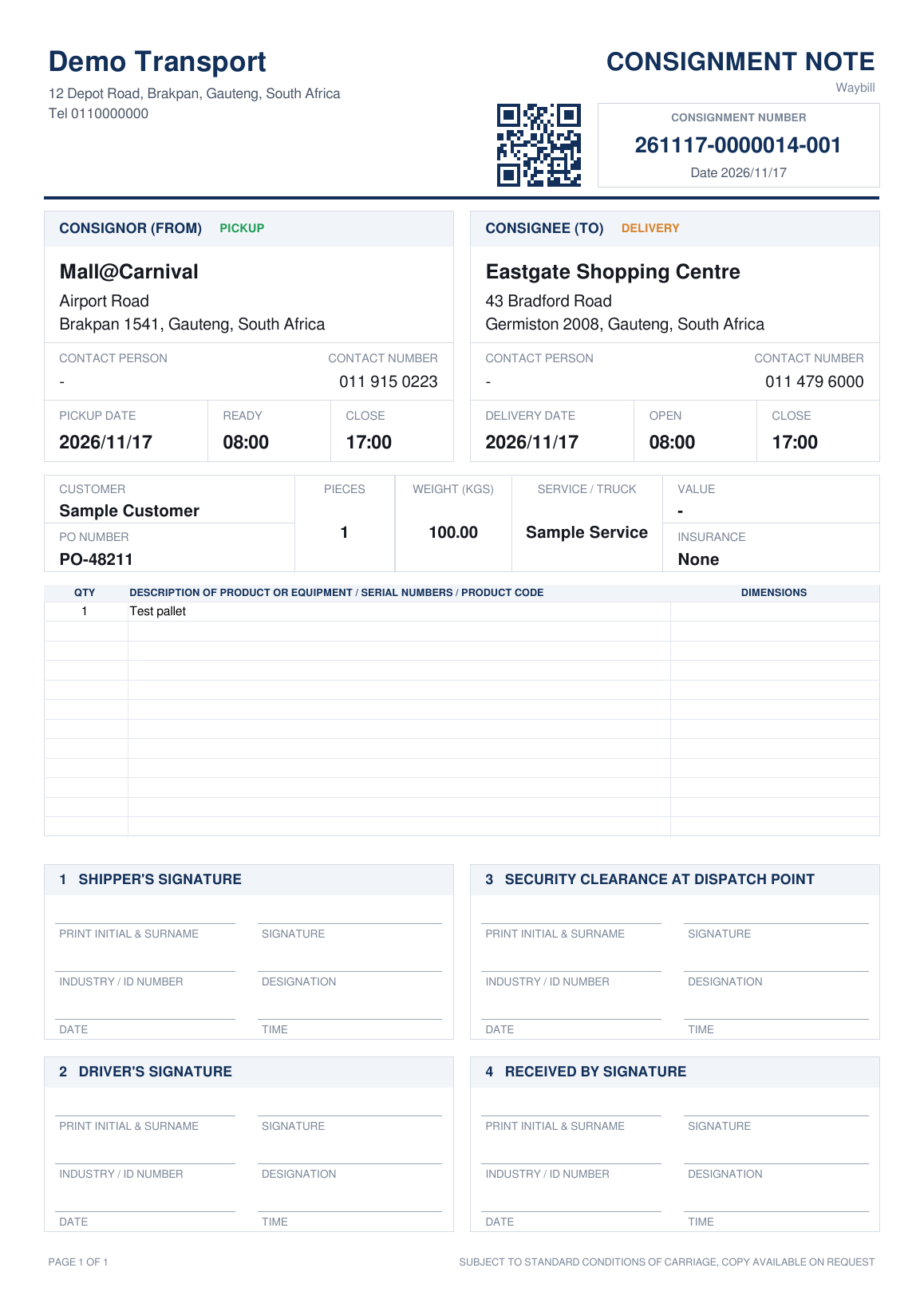
A worxTMS consignment note (waybill) with company name, QR code, consignment number, pickup and delivery details and signature blocks

Every document from one load

No typing twice, no Word templates, no lost paper. Open any document from the load card in one click.

1

Consignment note (waybill)

Made from the load the moment you save it.

  • Your name, address and phone at the top
  • QR code and a consignment number per drop
  • Pickup and delivery, contacts, dates and time windows
  • Pieces, weight, service, PO number and cargo lines
  • Signature blocks for shipper, driver, security and receiver
2

e-POD

Made by itself when the driver delivers.

  • Who received the goods
  • Date and time of delivery
  • GPS location of the delivery
  • Shared with your customer through the tracking link
3

Scanned POD

The signed or stamped paper copy, kept with the load.

  • Driver scans it with the worxAPP
  • Or the office uploads a PDF
  • Red dot until attached, green when done
4

Invoice

Made in your own accounting system with one click.

  • Xero, QuickBooks Online or the free built-in accounting
  • The POD goes along with the invoice
  • Email both to the customer from worxTMS
5

Statement

What each customer owes, ready to send.

  • Open invoices and payments
  • PDF or email from worxTMS
6

Quote

Price a job and send a neat quote.

  • Prices from your rate sheets
  • Sent as a PDF with your name on it

One pickup, many drops, one note each

When a truck collects once and delivers to several customers, every drop gets its own consignment note with its own number. Each receiver signs for their own goods, and every number is unique, so nothing gets mixed up.

Why it matters

  • Customers see a professional document with your name on it
  • Accounts teams get the invoice and the POD together
  • Disputes end quickly: time, place and receiver are on record
  • Nothing to print or file unless you want to

Questions

Do I have to type the waybill?

No. worxTMS makes it from the load you captured: addresses, contacts, dates, pieces, weight and service. Open it from the pickup's number on the load card and print or download it.

Does the e-POD need a signature?

No. It records who received the goods, the date and time and the GPS location. If the customer signs or stamps paper, the driver scans it with the worxAPP too.

Where are invoices made?

In your own accounting system: Xero, QuickBooks Online or the free accounting built into worxTMS. You can email the invoice and the POD together from worxTMS.

Do the documents show my company or worxTMS?

Your company. Your name and details are on every document.
Stop typing paperwork

Try worxTMS free for 30 days. No card needed.